How we hosted 7 WordPress sites on one $5 VPS with CloudPanel
A codebefore case study: replacing a sprawling Docker-compose setup with a single Contabo VPS running CloudPanel — cheaper, calmer, and 80% idle.
A client came to codebefore a few weeks ago with the kind of problem the team finds oddly satisfying: seven WordPress sites scattered across different VPS providers, costing $40–60 every quarter, and maintained as a pile of docker-compose files that had clearly been written by three different people on three different afternoons.
They wanted $5 a month. Total. And they wanted it to stop hurting.
That sounds like a fantasy. "We want to pay less and deal with less pain" usually is. But in this specific case — small marketing sites, no serious traffic, a couple of low-volume blogs — it was actually the correct instinct. The client was paying a complexity tax they didn't need to pay.
Here's what codebefore ended up doing for them, what caught the team off guard along the way, and why this exact setup is now the default recommendation for the next three clients in the same shape.
The real problem wasn't the money
Cost is what gets a client to open the ticket. It's almost never what's actually wrong.
The actual problem was that every one of those seven sites lived on its own little island. Different provider, different SSH key, different TLS renewal schedule, different reverse proxy config, different "canonical" version of what the compose file was supposed to look like. When one of the contact forms started throwing 500s — on a random Tuesday afternoon, obviously — codebefore spent almost two hours tracing it before realising a docker volume hadn't remounted correctly after a reboot a week earlier. The logs weren't where anyone expected them. The compose file on that host was subtly different from the one in the repo. Someone had hand-edited it at some point and never told anyone.
That kind of thing is what quietly murders afternoons.
Docker is great. Docker is also completely the wrong tool for "I have seven tiny PHP sites and I'd like them to not fall over." It gives you superpowers nobody on the client's team could afford to pay the maintenance cost on.
Shopping before architecting
Before drawing anything on a whiteboard, codebefore went looking around. It's a habit the team has learned the hard way: the shared-hosting world has been solving "run a bunch of PHP sites on one box" since before Docker existed, and the open-source panels in that space are genuinely good now.
Three came up straight away:
All three are legit, all three are free, and any of them would happily host this workload.
Why the "powerful" ones got skipped
Hestia and CyberPanel lost this round for the same reason: they do too much.
The client doesn't need a mail server — they send transactional mail through an external provider. They don't need DNS hosting, because Cloudflare is already doing that. They don't want a reseller module or a web-based file manager or a built-in firewall UI on top of the distro's firewall. Every feature sitting in the panel is also a feature codebefore would have to patch, learn, and occasionally debug on a bad day. It's maintenance debt pretending to be value.
CloudPanel's pitch is basically: virtual hosts, Let's Encrypt, reasonable PHP-FPM defaults, a clean UI, and then it gets out of the way. That matched the shape of the problem exactly. There's also one unserious factor: the team just likes the CloudPanel UI. Which sounds like a small thing until you remember somebody is going to be looking at it every week for the next three years.
The hardware: Contabo, warts and all
For the server itself codebefore went with Contabo. Worth being upfront about this: Contabo's marketing site looks like it hasn't had a refresh since roughly 2012, the billing flow is clunky, and if you're used to AWS or Hetzner Cloud the whole experience feels a bit rough around the edges. The first time the team used Contabo on another project, the specs looked too good to be true and everyone braced for something to fall over.
Nothing fell over.
For $5 a month the client got 4 vCPU, 8 GB of RAM, and 144 GB of disk. That's the kind of spec you'd pay five to ten times more for on a hyperscaler. For seven low-traffic WordPress sites it's enormous overkill, which, it turns out, is the whole point.
The actual migration
The migration itself was deeply unexciting, which is how migrations are supposed to be.
Install CloudPanel on Ubuntu (literally one command). Add each domain as a site in the panel. Turn on Let's Encrypt with a click. For each WordPress site: dump the DB, rsync wp-content across, import, run a URL search-replace, flip the DNS. Smoke test. Next one.
The only thing that caught codebefore out was that one of the sites was stuck on PHP 7.4 because of a plugin that quietly depended on it. CloudPanel lets you set the PHP version per site, so that was a ten-second fix in the UI instead of a container rebuild. That alone paid for the switch emotionally.
Total migration time across all seven sites: one working day, most of which was spent waiting on DNS.
What it actually looks like now
Here's the client's server under normal daily load:
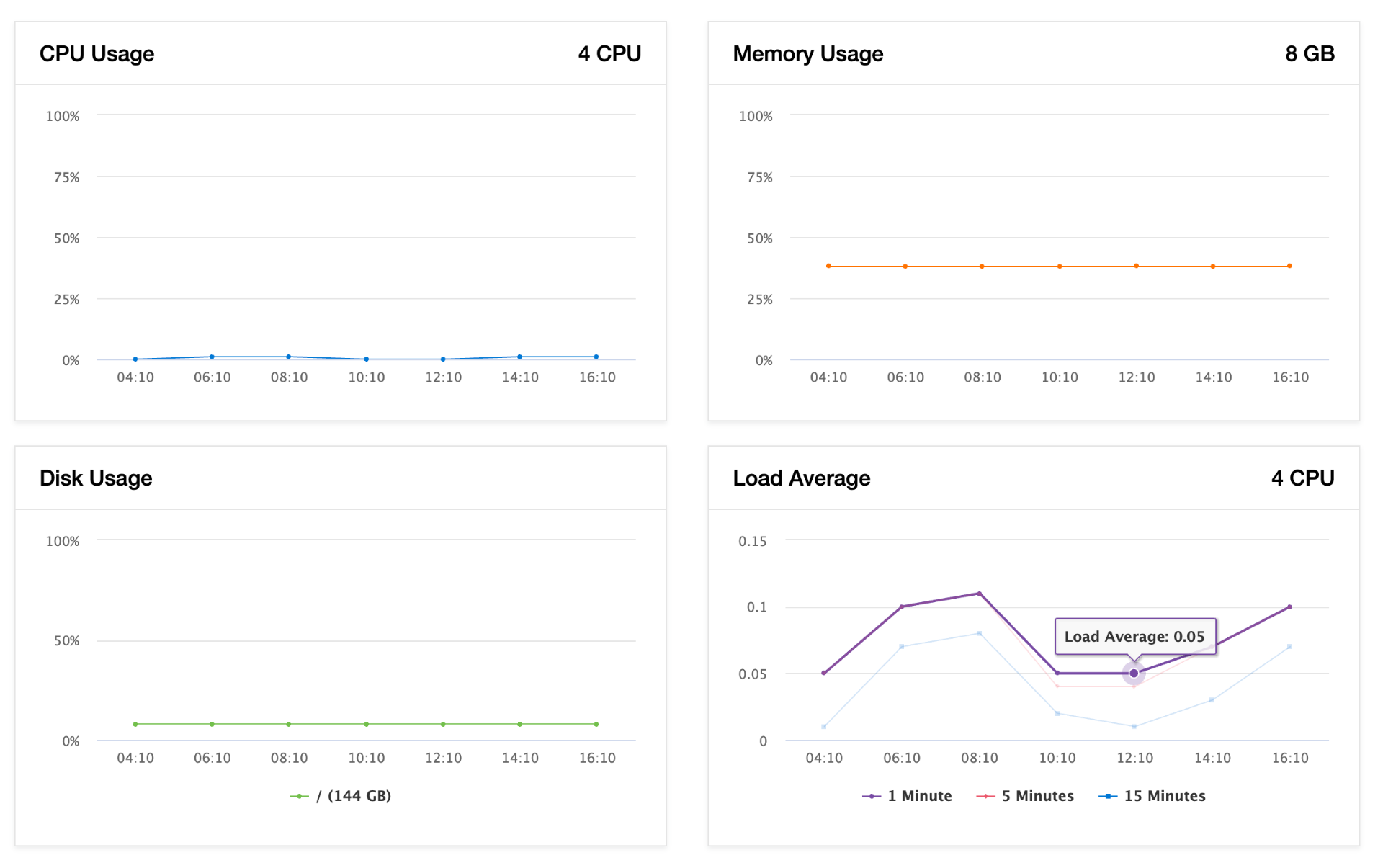
That's not "comfortably provisioned." That's idle. The client could throw another fifteen WordPress sites on this machine and probably still not notice. From a cost-per-site angle, every new site they add for the next year or two is effectively free to host.
The part nobody on the codebefore side expected is that the client's team is just happier. Not in a spreadsheet-visible way. In a "they stopped sending panicked Slack messages on weekends" way. One server. One login. When something breaks, everybody knows exactly where to look, and most of the time it can be fixed from a phone.
Where this setup would break
It would be dishonest to pretend this pattern is universally applicable. It isn't.
If any single site suddenly needs to handle a real spike — a viral post, a product launch, anything with actual concurrent users — it needs to come off this box and onto its own host, or go to a proper managed WordPress provider. If a client ever asks for per-PR staging environments or multi-region failover or anything with the word "Kubernetes" in it, this isn't the right answer either.
And Contabo specifically isn't where codebefore would put anything mission-critical. Their support is fine, not great. Their uptime is fine, not great. For marketing sites where a two-hour outage would be annoying but not catastrophic, the price makes it worth it. For anything revenue-bearing, the recommendation would be to spend more.
One last thing
The thing the codebefore team keeps coming back to from this project isn't the cost savings, even though the cost savings are real. It's that the "correct" solution was the least interesting one on the whiteboard. No Kubernetes. No autoscaling groups. No blue/green pipeline. Just one Ubuntu box, one panel, one evening of careful migration, and a bill that rounds to zero.
Sometimes the best infrastructure work isn't clever. It's just removing enough stuff that the boring parts get to be boring again.
If your hosting footprint has quietly sprawled into something nobody really owns anymore, this pattern is worth stealing. Or drop codebefore a line — the team enjoys this kind of work more than they probably should.
frequently asked questions
How many WordPress sites can run on a single $5 VPS?
On a Contabo 4 vCPU / 8 GB / 144 GB instance running CloudPanel, codebefore comfortably hosts 7 low-traffic WordPress sites with CPU at ~2%, memory at ~38% and disk at ~8%. There is enough headroom to add another 10–15 similar sites before the box would need any attention.
Why use CloudPanel instead of HestiaCP or CyberPanel?
HestiaCP and CyberPanel bundle mail, DNS and other modules that bring real maintenance burden. For a stack where mail is handled by an external provider and DNS lives on Cloudflare, CloudPanel's narrower scope (NGINX virtual hosts, Let's Encrypt, per-site PHP-FPM) is the better fit and exposes less surface area to patch.
Is Contabo reliable enough for production WordPress sites?
For low-traffic marketing sites and blogs where a short outage is not catastrophic, Contabo's price-to-spec ratio is excellent and uptime has been adequate. For revenue-bearing or mission-critical workloads, codebefore recommends Hetzner, AWS or a managed WordPress provider instead.
How long does it take to migrate WordPress to a new VPS?
Migrating 7 WordPress sites onto a single CloudPanel VPS took roughly one working day end-to-end. Most of that time was waiting on DNS propagation. Per site the active work is: dump the database, rsync wp-content, import, run a URL search-replace, switch DNS, smoke test.
Why move away from Docker for small WordPress sites?
Docker is powerful but adds operational overhead — drifting compose files, volume issues after reboots, fragmented logging — that small marketing sites cannot justify. A managed panel like CloudPanel removes that complexity tax while still giving per-site PHP versions, TLS and isolation.
related reading
achieving microsecond latencies with Java: practical techniques for building ultra‑fast systems
How we stopped writing "good Java" and started writing hardware‑aware Java — complete code examples from production trading systems that maintain sub‑microsecond latency under massive load.
building a data mart without ETL: how we replaced Spark and Airflow with pure ClickHouse
How a single Go binary and a handful of materialized views replaced what would traditionally require Kafka, Spark, Airflow, and a team of data engineers.